Fancy Text Generator
What Is a Fancy Text Generator?
Instagram has no font menu, yet bios full of 𝓼𝓬𝓻𝓲𝓹𝓽 and 𝐛𝐨𝐥𝐝 letters are everywhere. A fancy text generator is how people do it. It swaps each normal letter for a lookalike Unicode character, symbols that already live inside every phone and computer.
Because the result is plain text, not a font file, it copies and pastes anywhere text is allowed: bios, usernames, captions, comments and game names.
How to Generate Fancy Text in 3 Steps
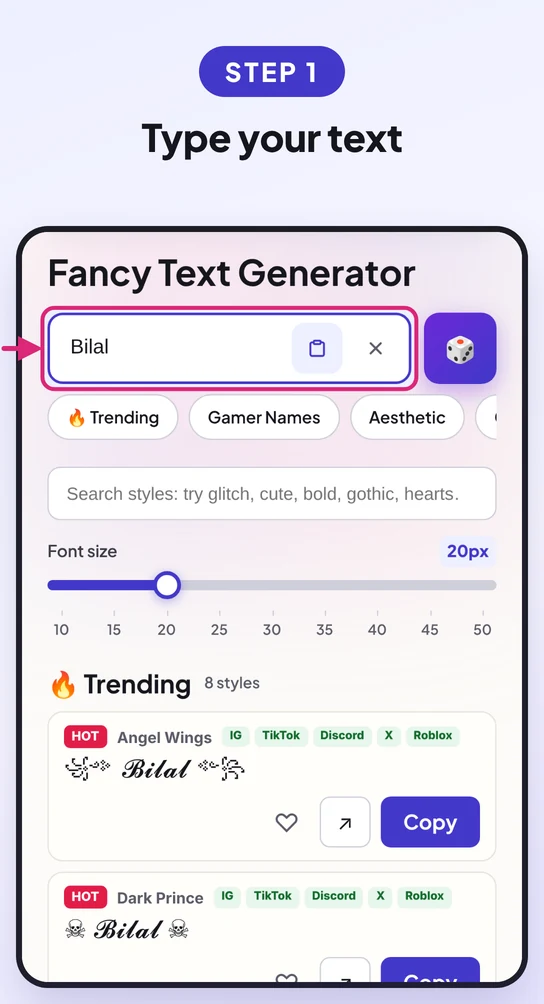
Type or paste your text into the box at the top. Every style updates as you type.
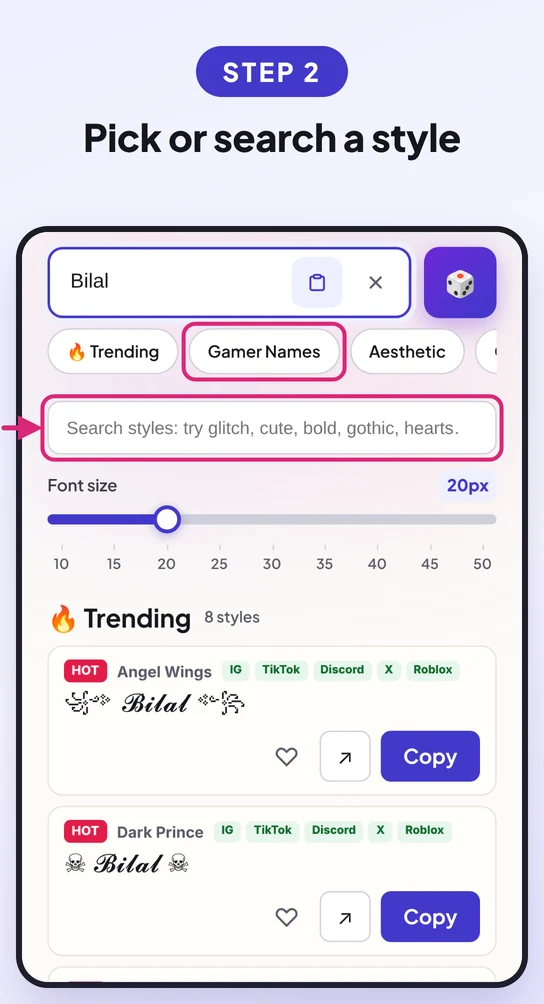
Start with Trending, jump to a category, or search a mood like cute, gamer or dark.
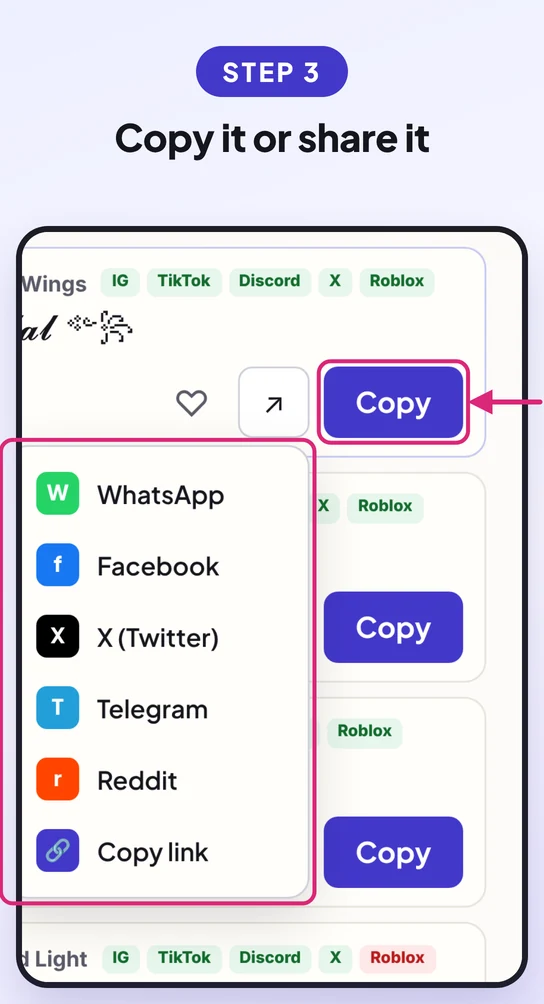
Tap Copy and paste it anywhere, or share it to WhatsApp, X or Telegram.
How to Know Which Platform Supports Each Style
Every style shows five platform badges: IG, TikTok, Discord, X and Roblox. They answer the one question other tools skip: will this actually work where I paste it?
Green badge: supported. The platform accepts the style and shows it correctly.
Red badge: not supported. The platform blocks it, strips the symbols, or shows empty boxes.

This matters most for names. Roblox filters many symbols, Instagram limits what its name field accepts, and heavy cursed text often gets cut off on X. Check the badge first and you won't have to guess.
What Makes FontHex Different?
| Feature | What it does |
|---|---|
| 1,000+ real styles | The coolest ones sit on top instead of plain bold and italic. |
| Platform badges | Green and red badges on every style for IG, TikTok, Discord, X and Roblox. |
| Smart search | Type "glitch" and see cursed, leetspeak and strike styles too. |
| 30 gamer styles | Ready-made names for Free Fire, PUBG and Roblox. |
| Favorites | Heart a style and it stays saved in your browser. |
| Size slider | Preview every style from 10 to 50 pixels. |
| Surprise me | Picks a random style for you, using your own text. |
| One-tap sharing | Send a style to WhatsApp, Facebook, X, Telegram or Reddit. |
| Private by design | This fancy text generator runs in your browser, so your text never leaves your device. |
Fancy Text Examples to Copy and Paste
Eight ready-made names, bios and tags. Tap Copy and paste, or type your own text in the tool above.
Popular Fancy Font Styles
Not sure where to start? These are the styles people copy most.
Strong and clean. Works almost everywhere, including names.
Handwritten script for bios, captions and quotes.
Old English letters for dark and medieval vibes.
Round circled letters that look playful and cute.
Tiny capitals for a calm, minimal look.
Wide spaced letters for soft aesthetic profiles.
Wings, crowns and symbols for game names and clan tags.
Raised mini letters for subtle details.
Fancy Letters and Numbers (A–Z, 0–9)
Need just one fancy letter? Copy it from the table.
| Letter | Bold | Script | Gothic | Bubble | Small Caps |
|---|---|---|---|---|---|
| A a | 𝐀 𝐚 | 𝒜 𝒶 | 𝔄 𝔞 | Ⓐ ⓐ | ᴀ ᴀ |
| B b | 𝐁 𝐛 | ℬ 𝒷 | 𝔅 𝔟 | Ⓑ ⓑ | ʙ ʙ |
| C c | 𝐂 𝐜 | 𝒞 𝒸 | ℭ 𝔠 | Ⓒ ⓒ | ᴄ ᴄ |
| D d | 𝐃 𝐝 | 𝒟 𝒹 | 𝔇 𝔡 | Ⓓ ⓓ | ᴅ ᴅ |
| E e | 𝐄 𝐞 | ℰ ℯ | 𝔈 𝔢 | Ⓔ ⓔ | ᴇ ᴇ |
| F f | 𝐅 𝐟 | ℱ 𝒻 | 𝔉 𝔣 | Ⓕ ⓕ | ꜰ ꜰ |
| G g | 𝐆 𝐠 | 𝒢 ℊ | 𝔊 𝔤 | Ⓖ ⓖ | ɢ ɢ |
| H h | 𝐇 𝐡 | ℋ 𝒽 | ℌ 𝔥 | Ⓗ ⓗ | ʜ ʜ |
| I i | 𝐈 𝐢 | ℐ 𝒾 | ℑ 𝔦 | Ⓘ ⓘ | ɪ ɪ |
| J j | 𝐉 𝐣 | 𝒥 𝒿 | 𝔍 𝔧 | Ⓙ ⓙ | ᴊ ᴊ |
| K k | 𝐊 𝐤 | 𝒦 𝓀 | 𝔎 𝔨 | Ⓚ ⓚ | ᴋ ᴋ |
| L l | 𝐋 𝐥 | ℒ 𝓁 | 𝔏 𝔩 | Ⓛ ⓛ | ʟ ʟ |
| M m | 𝐌 𝐦 | ℳ 𝓂 | 𝔐 𝔪 | Ⓜ ⓜ | ᴍ ᴍ |
| N n | 𝐍 𝐧 | 𝒩 𝓃 | 𝔑 𝔫 | Ⓝ ⓝ | ɴ ɴ |
| O o | 𝐎 𝐨 | 𝒪 ℴ | 𝔒 𝔬 | Ⓞ ⓞ | ᴏ ᴏ |
| P p | 𝐏 𝐩 | 𝒫 𝓅 | 𝔓 𝔭 | Ⓟ ⓟ | ᴘ ᴘ |
| Q q | 𝐐 𝐪 | 𝒬 𝓆 | 𝔔 𝔮 | Ⓠ ⓠ | ǫ ǫ |
| R r | 𝐑 𝐫 | ℛ 𝓇 | ℜ 𝔯 | Ⓡ ⓡ | ʀ ʀ |
| S s | 𝐒 𝐬 | 𝒮 𝓈 | 𝔖 𝔰 | Ⓢ ⓢ | s s |
| T t | 𝐓 𝐭 | 𝒯 𝓉 | 𝔗 𝔱 | Ⓣ ⓣ | ᴛ ᴛ |
| U u | 𝐔 𝐮 | 𝒰 𝓊 | 𝔘 𝔲 | Ⓤ ⓤ | ᴜ ᴜ |
| V v | 𝐕 𝐯 | 𝒱 𝓋 | 𝔙 𝔳 | Ⓥ ⓥ | ᴠ ᴠ |
| W w | 𝐖 𝐰 | 𝒲 𝓌 | 𝔚 𝔴 | Ⓦ ⓦ | ᴡ ᴡ |
| X x | 𝐗 𝐱 | 𝒳 𝓍 | 𝔛 𝔵 | Ⓧ ⓧ | x x |
| Y y | 𝐘 𝐲 | 𝒴 𝓎 | 𝔜 𝔶 | Ⓨ ⓨ | ʏ ʏ |
| Z z | 𝐙 𝐳 | 𝒵 𝓏 | ℨ 𝔷 | Ⓩ ⓩ | ᴢ ᴢ |
| Style | Numbers |
|---|---|
| Bold Serif | 𝟎𝟏𝟐𝟑𝟒𝟓𝟔𝟕𝟖𝟗 |
| Bold Sans | 𝟬𝟭𝟮𝟯𝟰𝟱𝟲𝟳𝟴𝟵 |
| Bubble | ⓪①②③④⑤⑥⑦⑧⑨ |
| Monospace | 𝟶𝟷𝟸𝟹𝟺𝟻𝟼𝟽𝟾𝟿 |
Cool Fonts for Instagram, TikTok, Discord, Games and More
Fancy text works almost anywhere you can type. Here is where each kind of style fits best.
Script, bold and small caps look clean in bios. Keep your name field simple so people can still find you.
Bold and bubble styles stand out in short captions and comments.
Nearly every style works in nicknames, About Me and messages.
Free Fire accepts most decorations like ꧁ ꧂, while PUBG and Roblox are strict. Use Gamer Names and check the badges.
Bios, posts and display names. Heavy cursed styles can get cut off.
Status, about line and group names.
Bio, posts and comments. Keep your profile name plain.
Channel description, comments and video titles (use sparingly).
Display name and story captions.
Profile name and summary.
A styled tagline under your name. Keep contact details plain.
Headings in Google Docs, Word or PowerPoint, if the font supports the symbols.
Does the FontHex Fancy Text Generator Work on Every Device?
Yes. It runs in your browser, so there is nothing to install. It works on Android, iPhone and iPad, Windows and Mac.
Open FontHex in Chrome, Edge or Firefox. Click Copy, then press Ctrl+V where you want the text.
Works in Safari, Chrome and Firefox. Click Copy, then press Cmd+V to paste.
Tap Copy, then press and hold any text field and tap Paste. Older phones may show boxes for rare symbols.
Tap Copy in Safari or Chrome, then tap the text field once and choose Paste.
Works in every modern browser:
Why Some Fancy Text Shows as Boxes
A box or a blank line means the device has no font for that character. It is common on older Android phones and some Windows PCs. Your friends may see boxes even if you don't, so for names and bios pick a style with all-green badges.
More FontHex Text Generators
FAQ
Is this fancy text generator free?
Yes. Every style is free to copy with no sign-up and no limits.
Is fancy text a real font?
No. It is Unicode characters that look like letters, which is why it works without installing anything.
Can I use fancy text on Instagram?
Yes, in bios, captions, comments and your display name. Look for the green IG badge.
Why does my fancy text look different on another phone?
Each device draws Unicode with its own fonts, so shapes vary slightly and rare symbols may show as boxes.
Can screen readers read fancy text?
Often not well. Keep important info like your name or contact details in plain text too.
Can I use fancy text in Google Docs or Word?
Yes. Paste it like normal text. If a letter shows as a box, switch to a font with wider Unicode support, like Segoe UI Symbol or Noto Sans.
Does fancy text work on iPhone, Android, Windows and Mac?
Yes. Bold, script, bubble and small caps show on almost every modern device. Rare symbols may show as boxes on older Android phones and some Windows PCs.
Is it safe to use fancy text in usernames and links?
For display names and bios, yes. Avoid it in email addresses, website links and login usernames, because lookalike letters are different characters and can break search or sign-in.
How many styles does the fancy text generator have?
More than 1,000: over 100 hand-made styles plus 1,000 combo styles, with new ones added regularly.